An AI receptionist may sound simple from the outside: a caller speaks, the system responds, and the conversation continues until the caller gets an answer or reaches a person.
Behind that conversation sits a pipeline of telephony infrastructure, speech recognition, language models, application logic, APIs, databases, and call routing.
The interesting part isn’t just the AI model. It’s how these components work together to turn an audio stream into useful business actions.
Businesses that want these capabilities have two paths.
They can buy a finished product. The market now includes dedicated AI receptionists such as XBert from Nextiva, along with tools from Goodcall, Dialzara, and others.
Or they can build one, which is what this article walks you through. Understanding the architecture helps either way: it shows what a commercial product is doing under the hood, and what a custom build needs to assemble.
A typical architecture looks something like this:
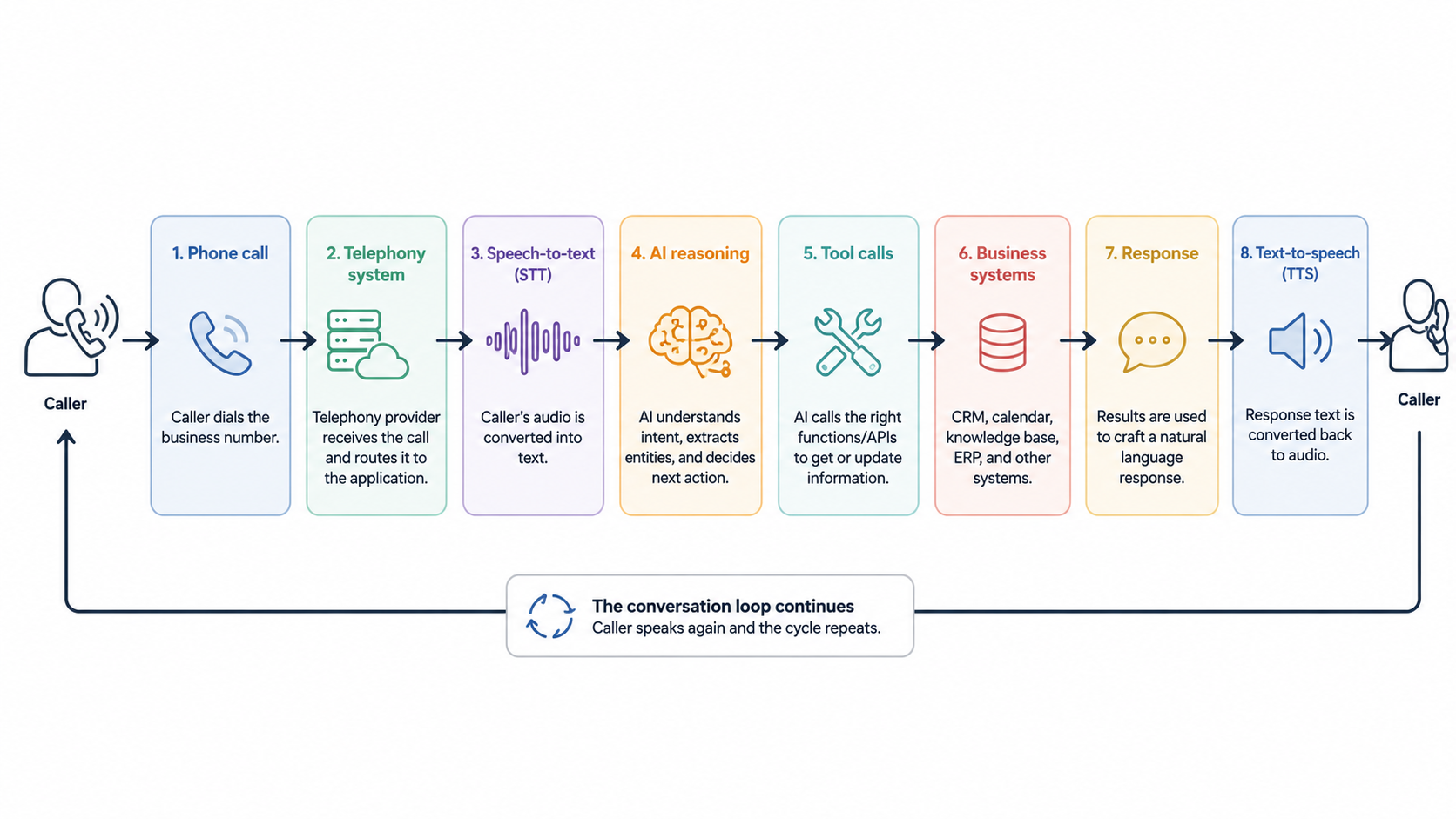
This article walks through the architecture behind an AI phone agent, from the moment a caller dials a business number to what happens after the call ends. You’ll see how telephony systems connect calls, how speech becomes text, how AI identifies intent and maintains conversation context, and how function calls connect the agent to calendars, CRMs, and other business systems. It also covers how agents decide when to hand a call to a human and what information can be passed along during that handoff.
A Phone Call Enters the System
The process starts like a regular phone call. A customer dials a business number, and the telecommunications provider receives the call.
The provider then needs to connect that call to an application capable of handling it.
One common approach is a webhook. The telephony provider sends an HTTP request to an application when an incoming call arrives. The application can then return instructions describing how the call should be handled.
The call itself needs carrier connectivity. Production systems typically use SIP trunking, which connects a voice application or phone system to the public telephone network over the internet.
Providers such as Nextiva, Twilio, and Bandwidth offer SIP trunking that supplies the numbers and call capacity an AI voice system runs on. From there, the application layer takes over.
For example, Twilio sends an HTTP request to a configured application when an incoming voice call arrives. The application can respond with TwiML instructions that control the call.
A simplified Node.js endpoint might look like this:
app.post("/incoming-call", (req, res) => {
  const response = new VoiceResponse();

  response.say("Hello. How can I help you today?");

  res.type("text/xml");
  res.send(response.toString());
});
This example doesn’t contain any AI yet. It simply shows the first architectural boundary.
The phone network handles the call. The application receives an event and decides what happens next.
From here, the application needs to process the caller’s audio.
Speech Becomes Text
People communicate with the system through audio, but most application logic works with structured data and text.
An automatic speech recognition (ASR) system converts the caller’s speech into text.
For example, a caller might say:
“I need to move my appointment from Friday to Monday afternoon.”
The speech recognition layer might produce:
{
  "text": "I need to move my appointment from Friday to Monday afternoon."
}
The exact response depends on the speech recognition system. Some systems can also provide timestamps, confidence information, speaker information, or partial transcripts.
The application can now pass the recognized text to its conversational layer.
This separation is useful because the AI reasoning layer doesn’t need to understand raw telephone audio. It receives text and returns a decision or response.
The System Determines What the Caller Wants
The next challenge is understanding intent.
Suppose three callers say:
“I want to book a consultation.”
“Can I move my appointment to next week?”
“Where is your office?”
The system needs to recognize that these requests require different workflows.
An application could represent the detected intent as structured data:
{
  "intent": "reschedule_appointment",
  "entities": {
    "current_day": "Friday",
    "requested_day": "Monday",
    "time_preference": "afternoon"
  }
}
The language model can produce this structure, or the application can derive it through another classification layer.
The important architectural point is that the application turns natural language into information that downstream systems can process.
The model might understand that the caller wants to reschedule an appointment, but it shouldn’t directly modify a calendar simply because it generated that interpretation. The application needs to control what happens next.
The Conversation Runs as a Loop
An AI phone agent doesn’t normally process an entire conversation in a single request.
Instead, it operates as a loop.
The caller speaks. Speech recognition converts the audio into text. The application sends the text and relevant context to the AI system. The AI determines what it needs to say or what action it needs to perform. The application generates audio and sends it back to the caller.
Then the caller speaks again.
A simplified version looks like this:
while (callIsActive) {
  const audio = await receiveAudio();

  const text = await speechToText(audio);

  const result = await processConversation({
    text,
    context: conversationContext
  });

  conversationContext = result.updatedContext;

  const audioResponse = await textToSpeech(result.response);

  await sendAudio(audioResponse);
}
This is conceptual code, not a complete phone implementation. Real systems need to handle streaming audio, interruptions, timeouts, errors, authentication, and provider-specific protocols.
Context is also important.
If the caller says:
“I want to book an appointment.”
The system might ask:
“What type of appointment do you need?”
The caller then says:
“An initial consultation.”
That second statement only makes sense because the application remembers the previous exchange.
Conversation state might contain information such as:
{
  "intent": "book_appointment",
  "appointment_type": "initial_consultation",
  "customer_name": "Jane Smith",
  "preferred_date": null
}
The system can add to this state as the conversation progresses.
The AI Calls Business Systems
This is where an AI receptionist becomes more than a voice chatbot.
Suppose a caller asks:
“Do you have anything available tomorrow afternoon?”
The AI can’t reliably answer that from the conversation alone. It needs current information from a calendar or scheduling system.
This is where function calling, also called tool calling, becomes useful.
The application can expose a limited set of functions to the AI:
const tools = [
  {
    name: "check_calendar",
    description: "Find available appointment slots",
    parameters: {
      date: "string",
      appointmentType: "string"
    }
  },
  {
    name: "book_appointment",
    description: "Book an available appointment",
    parameters: {
      slotId: "string",
      customerId: "string"
    }
  }
];
The model can determine that it needs check_calendar.
The application then executes the function:
const slots = await checkCalendar({
  date: "2026-08-21",
  appointmentType: "consultation"
});
The result goes back into the conversation context:
{
  "available_slots": [
    "2026-08-21T14:00:00",
    "2026-08-21T15:30:00"
  ]
}
The AI can then tell the caller which options are available.
The important architectural boundary is that the AI decides what action may be needed, while application code controls how that action is performed. That gives developers a place to enforce permissions, validate inputs, handle failures, and control access to business systems.
Booking an Appointment
Now consider the final step.
The caller selects one of the available times.
The AI can request an appointment booking:
{
  "tool": "book_appointment",
  "arguments": {
    "slotId": "slot_123",
    "customerId": "customer_456"
  }
}
The application validates the inputs, calls the scheduling system, and confirms the result before the AI communicates it back to the caller. This keeps business logic firmly in the application layer rather than delegating it entirely to the model.
Capturing Lead Information
Not every call ends in a booking. Some callers are gathering information, and those interactions still have business value.
As the conversation progresses, the application can extract and store relevant details — name, contact information, the service the caller was interested in, and any questions they asked. This data can be written to a CRM at the end of the call, giving the business a record of the interaction even when no appointment was scheduled.
Knowing When to Involve a Human
Some calls fall outside what an AI agent can handle. A caller may be distressed, may have an unusual request, or may simply ask to speak with a person.
The agent needs a way to detect these situations and transfer the call.
Triggers for escalation might include explicit requests (“Can I talk to someone?”), repeated failed attempts to resolve an intent, detected sentiment indicating frustration, or call types flagged as requiring human judgment.
When a transfer is needed, the application can pass context to the receiving agent — the caller’s name, the intent detected, any information already collected, and a summary of the conversation so far. This prevents the caller from having to repeat themselves.
What Happens After the Call
Once a call ends, the system can perform several post-call actions automatically.
A transcript of the conversation can be stored for review. The application can generate a summary of what was discussed and what outcome was reached. Any data collected during the call — contact details, appointment information, expressed interests — can be written to the relevant business systems.
If an appointment was booked, a confirmation message can be sent to the caller. If a lead was captured but no action was taken, the record can be flagged for follow-up.
What the Business Sees
From the business side, the AI receptionist surfaces as a dashboard or reporting layer that shows call volume, common intents, resolution rates, escalation rates, and individual call records.
This visibility matters because it lets businesses tune the system over time — adjusting how the agent handles specific intents, expanding the set of tools it can call, or identifying call types that consistently require human intervention.
The architecture behind an AI phone agent is a pipeline of well-defined components, each with a specific responsibility. Telephony handles connectivity. Speech recognition converts audio to text. A language model interprets intent and generates responses. Application code controls what actions are taken. Business systems provide the data and record the outcomes. Understanding how these layers interact makes it possible to build, evaluate, or extend any AI voice system effectively.