Therapy progress notes are written records of what happened during a therapy session. They may include what a client said, what the therapist observed, the topics discussed, and plans for the next session. Over time, these notes can add up to a large amount of text.
Reading one note helps us understand one session. But what if we want to look at several notes? Can we use text analysis to see how the language changes from one session to another?
Natural Language Processing (NLP) is a way of using computers to work with human language. With Python, you can break text into sentences, pick out language features, and use models to classify sentiment and emotion. In this tutorial, you’ll use spaCy’s language-processing pipeline for text processing and Hugging Face Transformers to run pretrained classification models.
You’ll build a small NLP pipeline using fictional therapy notes. You’ll use spaCy to process the text, two ready-made Hugging Face models to classify sentiment and emotion, pandas to organize results by session, and Matplotlib to create charts.
You can find the complete project code in the GitHub repository.
We are not trying to decide whether therapy is working. The goal is to learn how to turn written text into data that we can review, question, and display in charts.
At the end, you’ll have a practical Python project using spaCy, Hugging Face Transformers, pandas, and Matplotlib to explore sentiment, emotion, and language patterns in fictional therapy notes.
Note: This tutorial is for learning only and uses fictional text. The models have not been tested for clinical use. They cannot tell us whether therapy is working, identify problems in the therapist-client relationship, or replace a trained professional.
What NLP Can and Cannot Tell Us
Natural Language Processing (NLP) is a part of artificial intelligence that helps computers work with human language. Common NLP tasks include breaking text into words and sentences, identifying grammar, finding names and places, and classifying sentiment and emotion.
Each task does something different. Tokenization breaks text into smaller pieces, such as words. Part-of-speech tagging identifies how a word is used in a sentence, such as a noun or verb. Lemmatization maps a word to its base form, while named-entity recognition identifies items such as people, organizations, and places. These are examples of the components available in spaCy’s processing pipelines. Sentiment analysis estimates whether text sounds positive or negative based on examples the model learned from. Emotion classification gives scores for emotion categories the model learned during training.
These results do not tell us what a person is really feeling. A therapy note may contain the therapist’s own observations, a client’s exact words, or the therapist’s summary of what the client said. A model may not know who said something or understand the full situation. In this tutorial, we’ll talk about model predictions and language patterns, not a person’s emotions or progress in therapy.
What We Are Building
Our project will analyze a small collection of fictional session notes and produce four types of results:
- A sentiment prediction for each sentence
- Emotion predictions for each sentence, along with average scores
- Simple language features, such as counts of selected pronouns and phrases like “maybe” or “I think”
- A timeline and dashboard to compare the results across sessions
The workflow is:
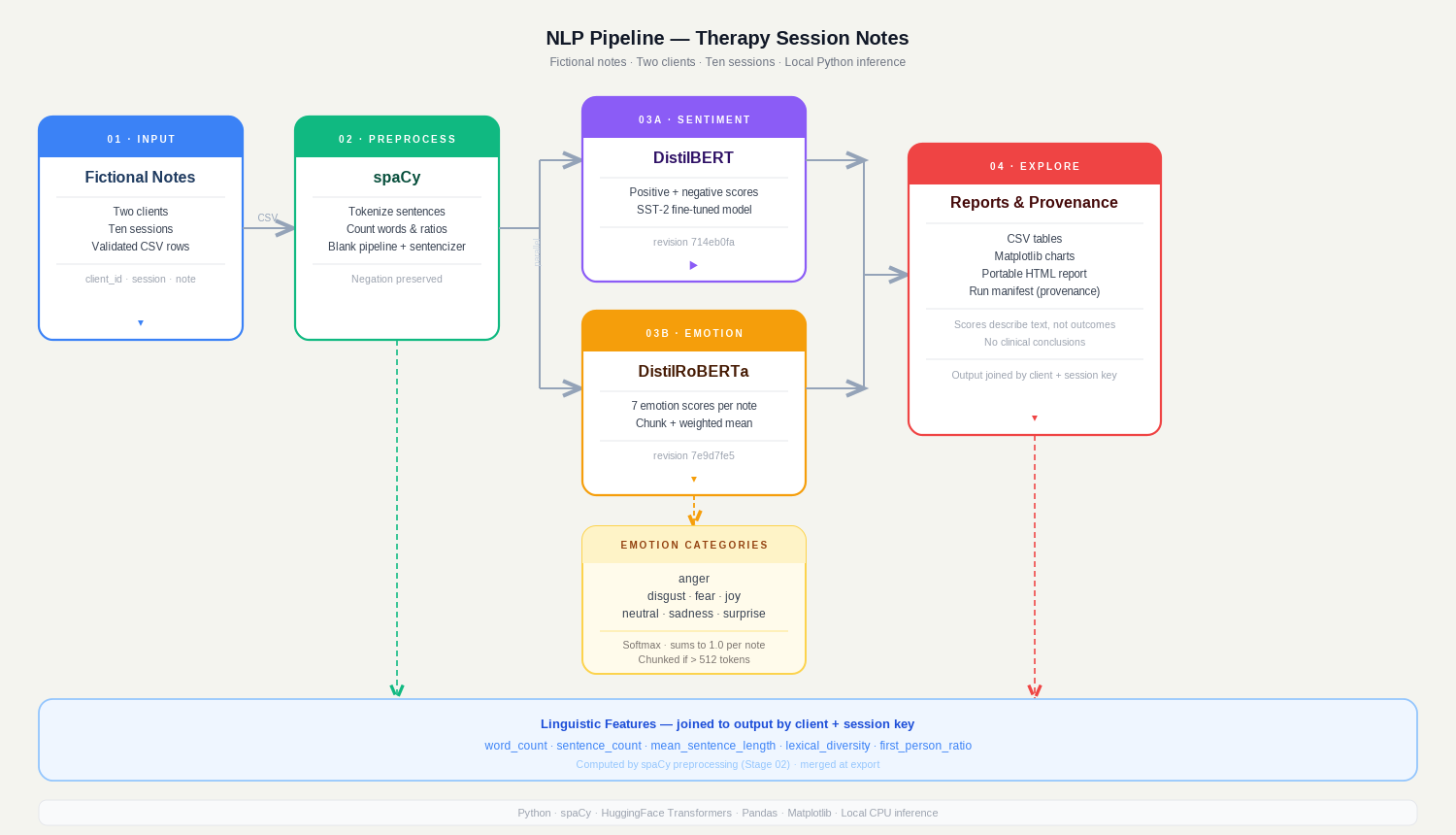
Figure 1. High-level view of the NLP workflow. The diagram also shows possible extensions, such as CSV and HTML reports, that are not implemented in every step of this tutorial.
We’ll keep the code in separate files so each part has one clear job. The project will not calculate a relationship-rupture score or label a clinical outcome.
Tools and Models
Python
Python will connect each part of the project. It also has many libraries for working with data and language.
spaCy is a Python library that helps us process text. Its processing pipeline can split text into tokens, assign part-of-speech tags, find base forms of words, and identify possible names or places. We’ll use its small English model, en_core_web_sm. This model works with general English, not specifically with therapy notes.
Hugging Face Transformers
We’ll use two pretrained classification models:
The first model, distilbert/distilbert-base-uncased-finetuned-sst-2-english, classifies text as positive or negative. Its model card identifies it as a DistilBERT checkpoint fine-tuned on the Stanford Sentiment Treebank (SST-2), a dataset of general English sentences. DistilBERT itself is described in the research paper “DistilBERT, a distilled version of BERT: Smaller, faster, cheaper and lighter”. Neither the checkpoint nor the original DistilBERT paper establishes that this model is suitable for therapy notes.
The second model, j-hartmann/emotion-english-distilroberta-base, predicts seven categories: anger, disgust, fear, joy, neutral, sadness, and surprise. According to Jochen Hartmann’s model card, it was trained on a balanced collection drawn from six datasets, including social media posts, student self-reports, and dialogue. It has not been validated for analysing therapy progress notes.
These models help us learn how text classification works. But because they were trained on general text, we cannot assume they will work well on therapy notes.
pandas and Matplotlib
pandas will help us organize the results in a table called a DataFrame. Matplotlib will help us turn the results into charts.
pytest
pytest is a tool for checking that our code works as expected. We’ll use sample model results in some tests, so we can test the code without downloading the large model files.
Set Up the Python Project
Create a folder for the project, then move into it:
mkdir therapy_notes_nlp
cd therapy_notes_nlp
mkdir data src tests images
Your project folders and files should look like this:
therapy_notes_nlp/
├── data/
│   └── synthetic_notes.json
├── images/
├── src/
│   ├── __init__.py
│   ├── preprocessor.py
│   ├── sentiment.py
│   ├── emotions.py
│   ├── tracker.py
│   └── visualizer.py
├── tests/
│   ├── conftest.py
│   ├── test_analyzer.py
│   ├── test_emotions.py
│   ├── test_preprocessor.py
│   ├── test_sentiment.py
│   └── test_tracker.py
├── analyzer.py
├── main.py
├── pytest.ini
└── requirements.txt
Create a virtual environment and activate it. A virtual environment keeps this project’s Python packages separate from packages used by your other projects:
python -m venv .venv

# Windows
.venv\Scripts\activate

# macOS or Linux
source .venv/bin/activate
Once the virtual environment is active, your project folder is ready, and you can move on to installing the libraries and building each part of the pipeline.