The gap between “you need a library for this” and “the browser does this” keeps closing. This is a practical guide to auditing your dependencies and finding what the web platform can now handle for you.
Most of us install a dependency once and never look at it again. It does its job, the tests pass, and we move on. But the web platform keeps moving too, and a surprising number of the libraries sitting in your package.json today are now built into the browser.
In a typical mid-sized JavaScript app, you can often find somewhere between 60KB and 90KB (minified and gzipped) of dependencies that the platform can now handle on its own. Date and number formatting, HTTP requests, modals, tooltips, deep cloning, grouping arrays: these were all real gaps a few years ago. A lot of them aren’t gaps anymore.
The reason those libraries stick around isn’t laziness. It’s that most teams don’t re-audit their dependencies on a Baseline cadence, or are simply not aware of how fast browsers are shipping these days. You check npm audit for security, but is this library still doing something the browser can’t? is a question that rarely gets asked. So the libraries stay.
In this article, we’ll run that audit together. Instead of going through dependencies one by one, we’ll work in clusters, because the wins tend to come in groups. We’ll do the bundle math, build a small decision framework you can reuse, and stay honest about the cases where the platform still falls short. By the end, you’ll have a repeatable process you can run on your own package.json.
What “Baseline” Actually Means
Before we start deleting things, let’s quickly recap what Baseline is. Feel free to skip this section if you’re already familiar.
Baseline is a project from the WebDX Community Group that tells you, in plain terms, how safe a web feature is to use across the major browsers (Chrome, Edge, Firefox, and Safari). A feature can be in one of three states:
- Limited availability The feature hasn’t shipped in all the major engines yet. Not safe to rely on without a fallback.
- Baseline Newly available The feature has just landed in all the major engines. It works for users on up-to-date browsers, but older devices in the wild may not have it yet.
- Baseline Widely available The feature has been in all the major engines for 30 months. At this point, you can reach for it without much thought.
That 30-month gap between “Newly” and “Widely” matters a lot for this audit. A feature that’s Widely available is something you can usually drop a library for today. A feature that’s only Newly available is something you can drop a library for if you check your audience first, or if you’re comfortable with a small feature check. We’ll treat those two cases differently throughout.
You can look any feature up on webstatus.dev, on MDN (every reference page shows a Baseline badge near the top), or programmatically with the web-features npm package. We’ll use all three later when we run the audit on a real project.
A Decision Framework Before You Delete Anything
It’s tempting to read “the browser does this now” and start ripping libraries out. Let’s not do that. A swap that looks free on paper can quietly break things for a chunk of your users, or cost you a feature you were relying on without realizing it.
So before dropping any library, ask three questions. We’ll reuse these in every cluster below.
1. Is the replacement Baseline-safe for my audience?
Not “is it Baseline” in the abstract, but “is it safe for the people who actually use my app.” If the native feature is Widely available, this is usually a yes. If it’s only Newly available, check your analytics or your browserslist config and see what share of your users would miss out. A B2B dashboard where everyone’s on the latest browser is a very different situation from a public-facing site with a long tail of old Android devices.
2. What does the swap actually cost?
Dropping a library isn’t always free. Sometimes the native feature isn’t supported widely enough yet, so you’d reach for a polyfill. If that polyfill is heavier than the library you’re removing, you’ve made your bundle bigger, unless you load it conditionally. We’ll see exactly this with Temporal later.
3. Does the platform feature cover my real use case?
Libraries often do more than the platform feature they resemble. axios isn’t just fetch with automatic JSON parsing; it has interceptors, request cancellation, and retries. If you’re using those, a straight swap to fetch will leave you reimplementing them. Check what you actually use before assuming it’s a drop-in replacement.
Keep these three in mind. Every cluster below is really just these questions applied to a different corner of your dependencies.
Cluster 1: Internationalization (The Biggest Drop Today Win)
This is the cluster where you’ll usually find the most KBs sitting on top of features that are already Widely available. The browser ships a whole family of formatting tools under the Intl namespace, and a lot of small, popular libraries became unnecessary.
Here are the usual suspects and what replaces them:
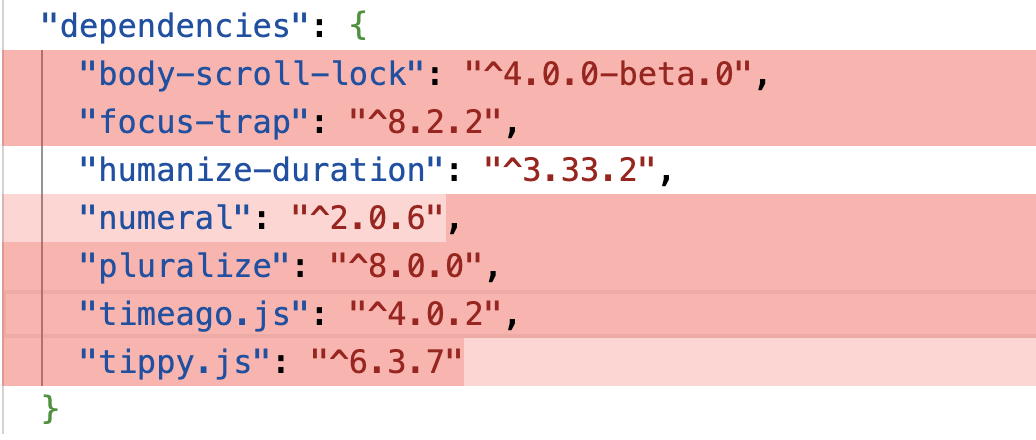
timeago.js(1 KB gz) →Intl.RelativeTimeFormatpluralize(2.3 KB gz) →Intl.PluralRulesnumeral(3.9 KB gz) →Intl.NumberFormathumanize-duration(6.6 KB gz) →Intl.DurationFormat- list-joining helpers →
Intl.ListFormat
Let’s walk through some of them.
Relative Time
timeago.js exists to turn a timestamp into “3 hours ago”. Intl.RelativeTimeFormat does the same thing, and it’s Baseline Widely available.
const rtf = new Intl.RelativeTimeFormat("en", { numeric: "auto" });

rtf.format(-1, "day");  // "yesterday"
rtf.format(3, "hour");  // "in 3 hours"
rtf.format(-2, "week"); // "2 weeks ago"
The numeric: "auto" option is the nice touch here: it gives you “yesterday” instead of “1 day ago” where the language has a word for it. You pass a number and a unit, and you get a localized string back.
You may be wondering about the one thing timeago.js does that this snippet doesn’t: it picks the unit for you. Given a date, timeago.js decides whether to say “seconds” or “days.” Intl.RelativeTimeFormat expects you to do that part. It’s a few lines of arithmetic (work out the difference, find the largest unit that fits), and once you’ve written that helper, you don’t need the library anymore.
Numbers, Currency, And Lists
Intl.NumberFormat covers most of what number-formatting libraries do: thousands separators, currency, percentages, and compact notation.
new Intl.NumberFormat("en-US").format(1234567.89);
// "1,234,567.89"

new Intl.NumberFormat("en-US", { style: "currency", currency: "USD" }).format(1234.5);
// "$1,234.50"

new Intl.NumberFormat("en", { notation: "compact" }).format(1200000);
// "1.2M"
And Intl.ListFormat, Widely available, handles the “join an array into a sentence” problem, including the Oxford comma, which is the kind of thing people write fiddly helper functions for:
const lf = new Intl.ListFormat("en", { style: "long", type: "conjunction" });

lf.format(["Alice", "Bob", "Carol"]);
// "Alice, Bob, and Carol"
The One Caveat: Durations
humanize-duration turns a number of milliseconds into “1 hour, 30 minutes”. The platform equivalent is Intl.DurationFormat:
const df = new Intl.DurationFormat("en", { style: "long" });

df.format({ hours: 1, minutes: 30 });
// "1 hour, 30 minutes"
One thing to keep in mind is that Intl.DurationFormat is Baseline Newly available at the time of writing, not Widely available. It landed in all the major engines in March 2025, and it’s on track to become Widely available in 2027. So this one fails question 1 for broad-audience apps unless you check your traffic first or add a fallback. For an internal tool on modern browsers, it’s fine today. For a public site with old devices, give it another year or guard it with a feature check.
The Math On This Cluster
If your app uses the full set (humanize-duration, timeago.js, pluralize, numeral), that’s roughly 14 KB gzipped of dependencies, most of it replaceable right now with Widely available APIs. The internationalization cluster is usually the easiest win in the whole audit.
Cluster 2: HTTP Clients
This cluster is more nuanced, so it’s a good one to slow down on.
The browser HTTP libraries people reach for most often are axios (17 KB gz) and superagent (19 KB gz). Both predate fetch becoming reliable across browsers, and both offer conveniences that made them genuinely valuable at the time. The question today is whether those conveniences are worth the weight.
fetch is Baseline Widely available and handles the core use case — making HTTP requests and reading responses — without any library. For a large portion of codebases, that’s all that’s actually being used. If your axios calls look like this:
const response = await axios.get("/api/data");
console.log(response.data);
The native equivalent is:
const response = await fetch("/api/data");
const data = await response.json();
console.log(data);
That’s a straightforward swap. Where it gets more complicated is when you’re using features that fetch doesn’t have out of the box: request interceptors, automatic retries, or instance-level base URL configuration. Before removing axios, check which of those you’re actually using. If the answer is none of them, the library is dead weight. If the answer is interceptors and retries, you’ll need to either keep the library or build those pieces yourself — and for most teams, keeping a well-tested library for that purpose is the right call.
The honest summary: fetch is the right default for new code and a reasonable replacement for simple axios usage, but it’s not a universal drop-in. Run question 3 carefully before making this swap.
Running The Audit On Your Own Project
With the framework and clusters in hand, here’s a practical process you can run on any project.
Step 1: Get a size-annotated dependency list.
Tools like Bundlephobia and pkg-size.dev let you look up the gzipped size of any npm package. For a full picture of what’s actually in your bundle, run your bundler’s analysis plugin — webpack-bundle-analyzer for Webpack, rollup-plugin-visualizer for Rollup and Vite — and look at what’s taking up space.
Step 2: Group your dependencies into clusters.
Look for the categories covered above: formatting and internationalization, HTTP clients, date handling, utility functions. Libraries in the same cluster often rise and fall together.
Step 3: For each candidate, run the three questions.
Is it Widely available for my audience? What’s the real cost of switching? Does the native API cover what I’m actually using? If all three answers are favorable, the library is a candidate for removal.
Step 4: Check Baseline status before committing.
Look the feature up on webstatus.dev or MDN before writing the replacement code. Baseline status can change, and what was “Newly available” six months ago might be closer to “Widely available” now.
Step 5: Remove one cluster at a time and measure.
Don’t remove everything in one PR. Pull out one cluster, run your tests, check your bundle size, and verify nothing broke before moving to the next. The point is to ship less JavaScript without quietly breaking things for your users — and the only way to be confident about that is to go one step at a time.
The web platform has genuinely closed a lot of the gaps that sent us to npm in the first place. Running this audit periodically — even just once a year — is one of the most reliable ways to keep your bundle lean without sacrificing the features your users rely on.